.jpg&w=1080&q=75)
AI Video Repurposing: Turn 1 Long Video Into 20 Viral Shorts in 15 Minutes (2026)

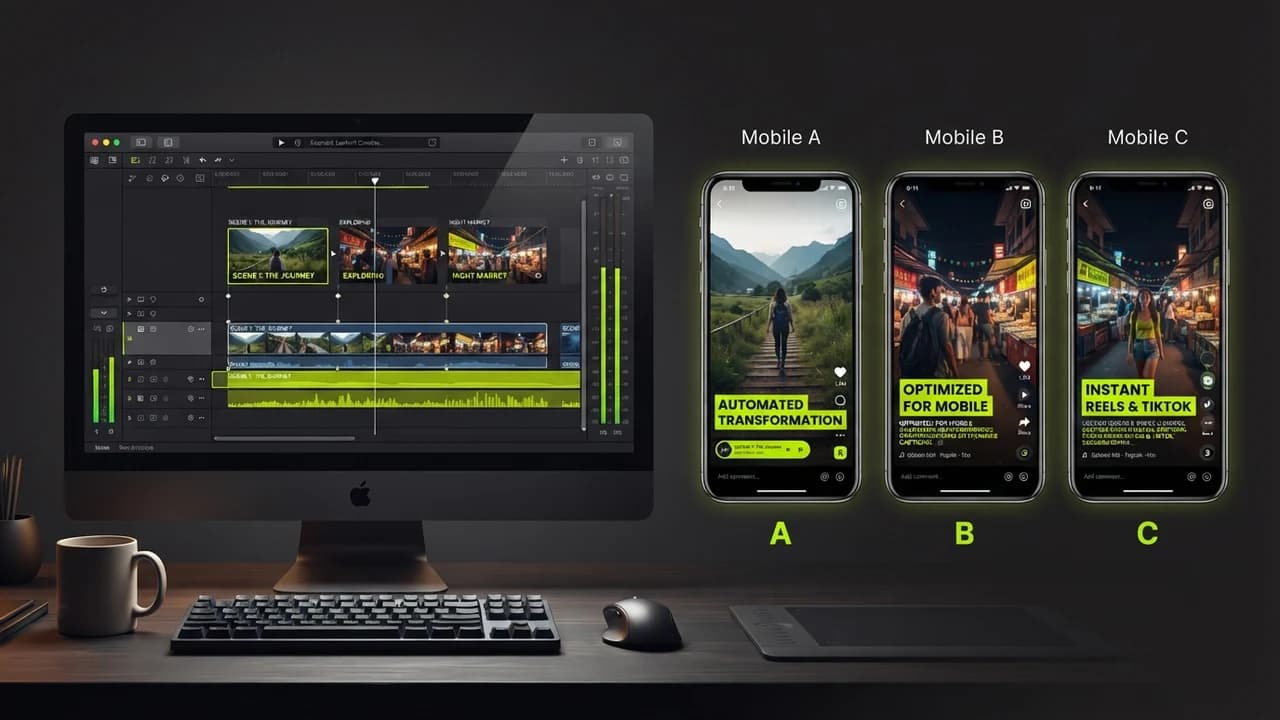
Indian founders, coaches, and digital solopreneurs can transform a single 45-minute webinar or podcast into twenty high-retention vertical Shorts and Reels in under fifteen minutes using automated AI video repurposing workflows in 2026.
Short-form vertical video (YouTube Shorts, Instagram Reels, and LinkedIn vertical clips) is the highest-reach organic customer acquisition channel in the modern digital economy. A single viral Reel can generate hundreds of thousands of organic views and drive dozens of qualified inbound leads without spending a single rupee on paid advertisements. However, shooting and editing 30 individual vertical videos every month is an exhausting grind. Most business owners spend hours scripting, filming, cutting video timelines, adding animated captions, and resizing aspect ratios, eventually burning out and abandoning organic video marketing altogether.
The Repurposing Revolution: Record Once, Distribute Everywhere
Smart digital entrepreneurs do not film 30 separate short videos every month. They record one substantive piece of long-form cornerstone content, such as a client coaching call, a founder interview, a YouTube tutorial, or an industry presentation, and let autonomous AI editing engines extract the most engaging moments automatically.
AI repurposing platforms have matured dramatically:
- Algorithmic Hook Detection: The AI analyzes facial expressions, vocal pitch shifts, and semantic topic transitions to identify the most captivating 30-to-60 second soundbites
- Automated Dynamic Subtitles: Generates animated, color-highlighted captions in modern creator styles with 99% phonetic accuracy
- Smart 9:16 Re-Framing: Uses computer vision face-tracking to keep the active speaker perfectly centered in vertical mobile aspect ratios
- Contextual B-Roll Insertion: Automatically selects and overlays relevant cinematic B-roll clips based on spoken words to eliminate visual monotony
The 3-Step 15-Minute Video Repurposing Workflow
Step 1: Upload Your Long-Form Video to Opus Clip or Klap
You do not need complex video editing software like Adobe Premiere or Final Cut Pro:
- Open an AI repurposing platform (such as Opus Clip, Klap.app, or Munch)
- Paste your YouTube video URL or upload the raw MP4 recording of your webinar or interview
- Select your target clip duration (for example: 30 to 60 seconds)
How Does the Virality Score Work?
Platforms like Opus Clip evaluate your video against thousands of viral social media patterns, assigning each extracted clip a Virality Score (0 to 100) based on hook strength, pacing, and narrative resolution.
Step 2: Customize Typography, Brand Colors, and Captions
Within 8 minutes, the AI generates 15 to 20 polished, ready-to-publish vertical clips:
- Dynamic Animated Captions: Select creator caption presets (bold sans-serif fonts with electric lime and yellow active-word highlights)
- Auto-Emojis and Sound Effects: The AI inserts relevant emoji badges and subtle audio swooshes at punchy transition moments
- Smart Video Aspect Ratio: The speaker remains in crisp focus, with multi-speaker split-screen layouts applied automatically during conversational interviews
Step 3: Schedule Across YouTube Shorts, Instagram Reels, and LinkedIn
Rather than uploading videos manually from your smartphone four times a day, use automated social schedulers (like Buffer, Metricool, or Publer):
- Schedule one high-retention Short per day across all major social networks simultaneously
- Include an automated pinned comment directing viewers to your primary business website or free digital course
- One 45-minute monthly recording session provides sufficient daily video content for an entire month
Output Comparison: Traditional Video Editing vs AI Repurposing Engine
Production Metric | Traditional Freelance Video Editor | Automated AI Repurposing Pipeline |
|---|---|---|
Editing Turnaround Time | 3 to 5 business days | Under 15 minutes |
Monthly Production Cost | ₹18,000 – ₹35,000 | ₹1,200 – ₹2,500 (software subscription) |
Short-Form Clips Generated | 4 to 8 clips per month | 20 to 30 clips per single recording |
Captioning and Framing Accuracy | Manual typing (frequent typos) | 99% automated phonetic sync |
Output Velocity | 1 to 2 videos per week | 1 to 2 videos per day consistently |
Building Massive Brand Authority on Autopilot
Content consistency is the ultimate currency of social media algorithms. By establishing an automated repurposing pipeline, you liberate yourself from the daily content hamster wheel, turning your existing knowledge and client discussions into an omnipresent organic customer acquisition engine.
The Zero To AI academy provides practical workflows, prompt libraries, and non-coder systems to help ambitious professionals scale their digital brand presence. Explore our masterclasses and resources at zerotoai.in.

Learn to build AI workflows that handle your busywork — live sessions, real projects, zero code.
See the courseBeginner-friendly