.jpg&w=1080&q=75)
Tally + Zoho + AI: How Non-Coders Automate GST Invoicing & Payment Reminders in 15 Minutes

Vendor Bill Intake | Download PDF from WhatsApp or Email | Auto-ingested via webhook or dedicated inbox |
Data Extraction | Manual typing of GSTIN, HSN, Tax Split | Vision AI extracts all fields in 3 seconds |
Accounting Entry | Manual ledger creation in Tally/Zoho | Auto-synced with pre-mapped expense accounts |
Payment Follow-up | Accountant calls or texts client manually | Auto-scheduled polite WhatsApp payment nudges |
Error Rate | High (typos in invoice numbers & tax rates) | Near zero with automated validation checks |
Time Spent | 12–15 hours / week | Under 30 minutes / week |
Step 1: Extracting Invoice Data With Vision AI in Seconds
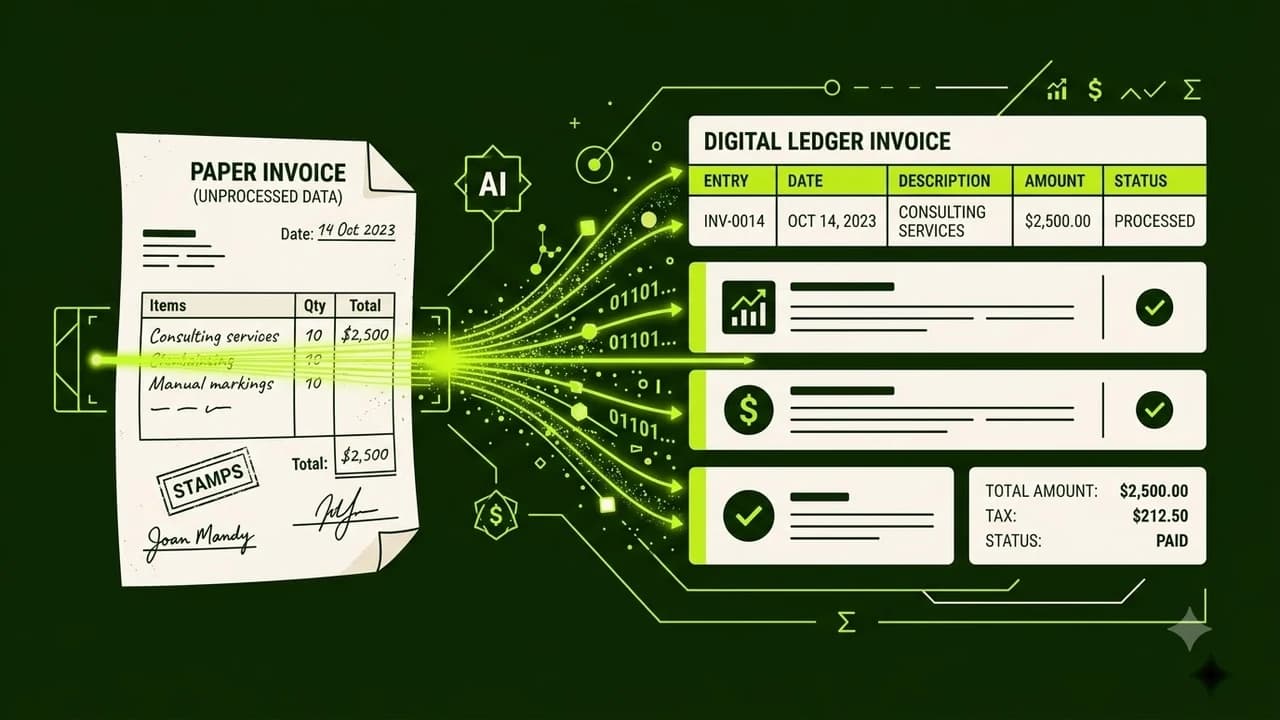
When a vendor sends a PDF or photo of an invoice on WhatsApp, Vision AI models (like GPT-4o or Claude 3.5 Sonnet) can extract every critical field with zero manual data entry.
Key fields extracted automatically:
- Vendor Legal Name & GSTIN
- Invoice Number & Date
- HSN / SAC Codes
- Taxable Value, CGST, SGST, and IGST splits
- Bank Account Number & IFSC / UPI ID
You don't need custom programming. Using a simple visual tool like Make.com or n8n, you attach an AI node that reads the invoice file and outputs clean, structured JSON ready for your accounting system.
Step 2: Auto-Syncing With Zoho Books or Tally Prime
Once the invoice data is structured, the automation routes it directly into your accounting software:
For Zoho Books Users
Zoho Books offers direct API connectors and email-inbox document parsing. You can set up a dedicated email ([email protected]). When invoices land there, your automated AI workflow extracts line items and creates a draft bill awaiting a 1-click approval.
For Tally Prime Users
Tally Prime supports XML and Excel data imports. Using a lightweight connector or Google Sheets sync, your AI pipeline writes verified invoice rows into a structured Google Sheet that auto-imports into Tally vouchers daily.
Step 3: Automating Polite WhatsApp Payment Reminders
Chasing overdue payments is awkward and time-consuming. An automated payment reminder engine solves this by sending calibrated, polite messages at specific intervals:
- 3 Days Before Due Date: "Hi [Client Name], just a quick heads-up that Invoice #[1042] for ₹25,000 is due on Friday. Here is the direct UPI payment link: [Link]. Let us know if you need any assistance!"
- On Due Date: "Good morning! Invoice #[1042] is due today. Please find attached the GST invoice copy for your accounts team."
- 3 Days Overdue: "Hi [Client Name], we noticed Invoice #[1042] is pending. Could you please share the expected payment date so we can update our records?"
Because the system sends these messages automatically based on your invoice database status, you eliminate emotional friction while improving cash collection speed by 40%.
The 15-Minute Setup Blueprint for Non-Coders
Here is how you can implement this workflow today:
- Set Up a Google Drive Drop Folder: Create a folder named "Incoming Invoices". Whenever a vendor emails or WhatsApps a bill, drop the file here.
- Connect n8n or Make.com: Set a trigger for "New File in Google Drive".
- Add the AI Vision Node: Prompt the AI: "Extract Vendor Name, GSTIN, Invoice Number, Total Amount, CGST, SGST, IGST as JSON."
- Append to Master Accounting Sheet / Zoho: Send the parsed output to your Google Sheets reconciliation ledger or Zoho Books Drafts.
- Set Up Due Date Reminders: Create a daily scheduled trigger that checks for invoices marked 'Unpaid' past their due date and dispatches the WhatsApp notification.

Learn to build AI workflows that handle your busywork — live sessions, real projects, zero code.
See the courseBeginner-friendly