.jpg&w=1080&q=75)
7 Free AI Chrome Extensions Every Indian Office Worker Needs in 2026

7 Free AI Chrome Extensions Every Indian Office Worker Needs in 2026
The best free AI Chrome extensions for Indian office workers in 2026 are Harpa AI, Scribe, Merlin, Wiseone, Claude in Chrome, Tactiq, and Perplexity. These lightweight browser tools automate meeting transcription, visual standard operating procedures, web research, and email drafting without requiring software coding or paid enterprise licenses.
A typical corporate workday in Mumbai, Bengaluru, Pune, or Gurugram involves hours of administrative busywork. Office professionals spend their mornings transcribing video calls, documenting step-by-step processes for junior staff, drafting repetitive email updates in Gmail, and copying table data from vendor websites.
While enterprise AI software licenses often cost thousands of rupees per seat each month, several high-performing browser extensions offer generous free plans. By integrating these extensions into your daily workflow, you can reclaim up to two productive hours every day while keeping sensitive client data secure.
Why Browser-Based AI Tools Outperform Standalone Software
Opening a separate browser tab, logging into a dedicated AI portal, and copying prompts back and forth breaks your focus. In-browser extensions solve this problem by embedding intelligence directly into the websites where you already conduct business:
- Inline Context: The extension reads the active webpage, spreadsheet, or email thread automatically, eliminating the need to copy-paste background information.
- Zero IT Approval Friction: Most free extensions operate as client-side browser add-ons that do not require administrator desktop installation privileges.
- Instant Keyboard Shortcuts: You can summon research summaries, draft replies, or capture workflows using a single keystroke.
- Predictable Free Tiers: Generous free allowances allow individual employees to improve their output without asking management for reimbursement.
Comparison of the 7 Best AI Chrome Extensions for Indian Workplaces
The table below summarizes each tool across its primary workflow function, free tier allowance, corporate privacy rating, and ideal workplace scenario:
Extension Name | Primary Office Function | Free Tier Allowance | Privacy & Security Score | Ideal Indian Office Use Case |
|---|---|---|---|---|
Harpa AI | Web automation & page tracking | Free tier with BYO API key | 9/10 (Local browser execution) | Tracking competitor pricing on Amazon India & GeM |
Scribe | Visual SOP generation | 100% free for web capture | 8/10 (Cloud stored guides) | Creating step-by-step training guides for new hires |
Merlin | In-box email & LinkedIn replies | 51 free queries daily | 8/10 (SOC2 certified backend) | Responding to client Gmail inquiries & vendor quotes |
Wiseone | Fact-checking & PDF analysis | Free core reading plan | 8/10 (GDPR compliant reader) | Analyzing complex tender documents & GST circulars |
Claude in Chrome | Long-form writing & synthesis | Free tier on Anthropic web | 9/10 (Strict non-training policy) | Summarizing lengthy board reports & project briefs |
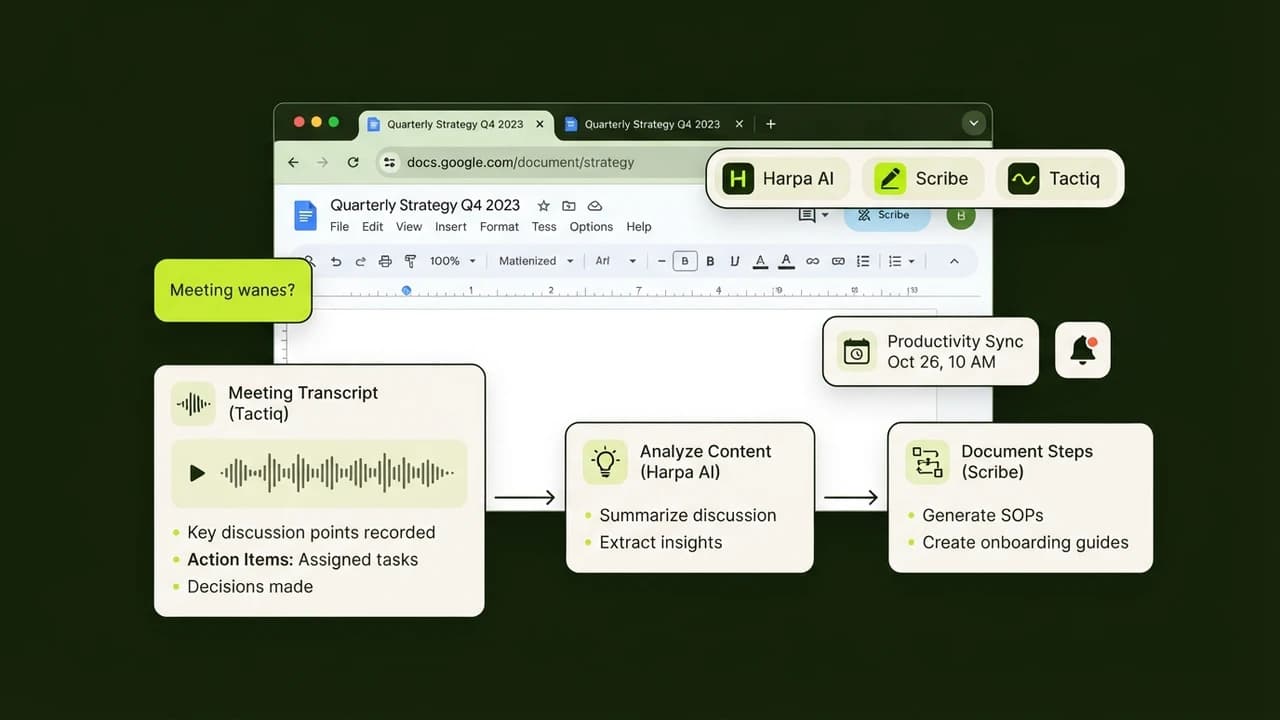
Tactiq | Live meeting transcription | 10 free transcribed meetings/mo | 8/10 (Audio not stored) | Generating action items from Google Meet client calls |
Perplexity | Real-time verified web search | Free unlimited quick searches | 8/10 (Encrypted queries) | Sourcing cited statistics for marketing decks |
In-Depth Review of the 7 Free AI Chrome Extensions
Each tool addresses a distinct workplace challenge. Here is how they perform under real corporate conditions:
1. Harpa AI (Web Automation and Price Monitoring)
Harpa AI combines hybrid AI intelligence with local browser automation. Unlike standard web bots, Harpa runs directly inside your active browser session, meaning it can interact with password-protected dashboards and portals without needing API access.
- What It Does: Automates web scraping, summarizes YouTube webinars, tracks price drops on portals like IndiaMART or Amazon India, and alerts you when a webpage changes.
- Free Allowance: Comprehensive free features with no subscription required when connected to your own free API keys or web chat session.
- Corporate Privacy Score: 9/10. Processes browser automations locally on your machine, meaning your internal corporate dashboard data remains on your computer.
2. Scribe (Automatic Visual SOP and Training Guide Creator)
Documenting workplace processes for colleagues or interns often takes hours of capturing screenshots and writing descriptions. Scribe transforms this chore into an instant background action.
- What It Does: Once you click record, Scribe tracks your clicks across web applications, automatically capturing annotated screenshots and typing clear instructional text.
- Free Allowance: Unlimited visual guide generation for web applications on the basic free plan.
- Corporate Privacy Score: 8/10. Allows users to blur sensitive personal information, client contact details, or bank balance figures before sharing the final guide link.
3. Merlin (Inline Email and LinkedIn Assistant)
Switching back and forth between messaging platforms and language model tabs slows down client communications. Merlin places a floating AI assistant directly into your Gmail, Outlook Web, and LinkedIn message boxes.
- What It Does: Drafts polite client replies, summarizes long email threads with ten past replies, and rewrites rough draft paragraphs into crisp professional English.
- Free Allowance: 51 free daily credits refreshed every twenty-four hours.
- Corporate Privacy Score: 8/10. Enterprise-grade encryption that does not retain user conversation logs for model retraining.
4. Wiseone (Smart Reading and Document Verification)
Corporate professionals frequently review regulatory updates, tax notifications, and technical whitepapers. Wiseone acts as a digital reading analyst that highlights complex terminology and cross-checks statements.
- What It Does: Explains legal and financial terms in plain English, extracts key takeaways from long PDF circulars, and compares claims against reputable web sources.
- Free Allowance: Generous free access to core reading mode and web summaries.
- Corporate Privacy Score: 8/10. Complies with global privacy benchmarks and analyzes documents without indexing private files into public databases.
5. Claude in Chrome (Long-Form Synthesis and Analytical Reasoning)
Anthropic's Claude model is recognized for its clear, measured tone and ability to follow nuanced instructions without generating marketing hype.
- What It Does: Synthesizes lengthy industry reports, creates structured Excel formulas from natural descriptions, and edits internal memos for tone and clarity.
- Free Allowance: Free daily messaging limits on the official Anthropic interface.
- Corporate Privacy Score: 9/10. Clear enterprise policies ensuring commercial consumer prompts are not used to train future foundational weights.
6. Tactiq (Google Meet and Zoom Meeting Transcription)
Taking manual notes while leading an active client meeting is distracting. Tactiq captures real-time speaker transcripts from Google Meet, Microsoft Teams, and Zoom directly inside Chrome.
- What It Does: Records spoken dialogue word-for-word, identifies who spoke each sentence, and automatically generates a bulleted list of action items and decisions when the call ends.
- Free Allowance: 10 free meeting transcriptions per month with unlimited local exports.
- Corporate Privacy Score: 8/10. Tactiq does not store audio recordings. It captures live closed captions and processes text summaries securely.
7. Perplexity Chrome Extension (Fact-Checked Web Research)
When conducting market research for a business proposal, standard search engines present sponsored ads and outdated blog articles. Perplexity provides direct, cited answers backed by verified sources.
- What It Does: Summarizes any web article in two paragraphs, extracts specific data points, and answers follow-up research questions with clickable citations.
- Free Allowance: Unlimited basic searches and page queries on the free tier.
- Corporate Privacy Score: 8/10. Secure query transmission with no personal identifiers passed to external third parties.
Real Workplace Impact: How a Mumbai Marketing Executive Saved 9 Hours Weekly
To illustrate practical time savings, consider an account manager at a boutique digital agency in Lower Parel, Mumbai:
The Daily Administrative Routine
Before adopting browser extensions, the account manager spent:
- 45 minutes daily transcribing client feedback calls from Google Meet.
- 60 minutes writing step-by-step reporting guides for two incoming interns.
- 40 minutes responding to routine status inquiries across Gmail and LinkedIn.
- 30 minutes reading through vendor proposals and extracting pricing terms.
- Total Lost Time: Over 14 hours per week spent on non-revenue administrative chores.
The Automated Workflow with Free Extensions
By deploying Tactiq for client calls, Scribe for intern documentation, Merlin for routine client updates, and Wiseone for contract analysis:
- Meeting recaps generated automatically upon hanging up (saving 35 minutes daily).
- Internal documentation created while executing tasks once (saving 45 minutes daily).
- Email draft responses prepared with single-click suggestions (saving 25 minutes daily).
- Total Weekly Savings: 9.5 productive hours reclaimed each week, allowing the executive to handle three additional client accounts without working overtime.
4 Common Mistakes Indian Professionals Make with AI Extensions
Browser extensions provide immense utility, but using them carelessly on corporate laptops can create compliance issues. Keep these four best practices in mind:
1. Pasting Proprietary Customer or Banking Data
Never submit confidential customer PAN numbers, credit details, or unreleased financial statements into browser extensions. Even security-focused tools should only process sanitized text where private identifiers have been removed.
2. Installing Unverified Extensions with Broad Permissions
Before installing any Chrome extension, inspect the requested browser permissions. Avoid add-ons that ask for permission to read and change all your data on every website you visit unless the tool has established credentials and verified developer reviews.
3. Relying on Machine Summaries Without Verification
While language models extract document highlights efficiently, they can occasionally misinterpret technical figures or statutory deadlines. Always verify critical statutory dates, GST percentages, and penalty amounts against the primary government document.
4. Overloading Chrome with Ten Active Add-Ons
Running multiple heavy AI extensions simultaneously consumes substantial system memory, slowing down your browser. Keep two or three primary tools enabled for daily routines, and toggle specialized tools on only when needed.
Master Practical AI Workflows at Zero To AI
Using free browser tools is the fastest way for Indian salaried professionals and small business owners to double their daily workplace output.
Zero To AI provides simple, jargon-free video courses tailored for non-coders who want to build real productivity workflows and advance their careers without learning complex programming languages.

Learn to build AI workflows that handle your busywork — live sessions, real projects, zero code.
See the courseBeginner-friendly