.jpg&w=1080&q=75)
How to Build an AI Cold Email Lead Generation Agent Without Coding (2026)

How to Build an AI Cold Email Lead Generation Agent Without Coding (2026)
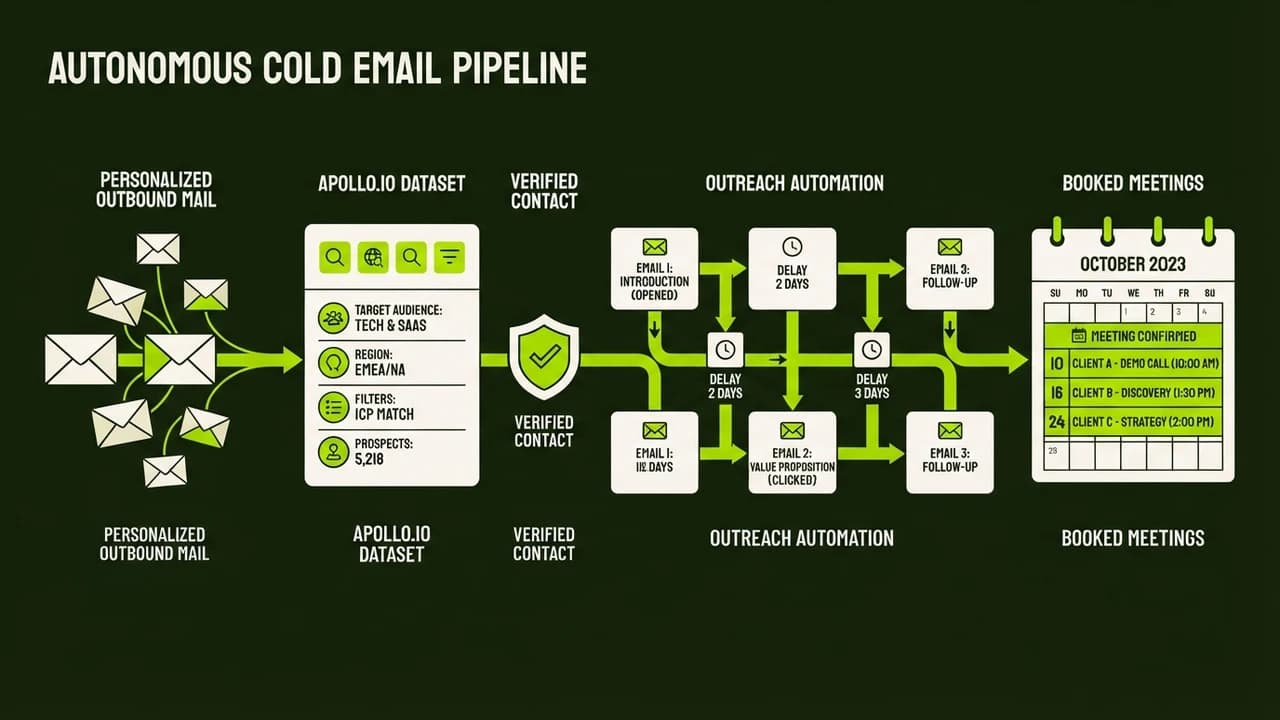
An AI cold email lead generation agent automates prospect discovery, contact enrichment, hyper-personalized icebreaker writing, and scheduled email sending without writing a single line of code. By connecting tools like Apollo, Google Sheets, Claude 3.5 Sonnet, and Instantly through visual automation platforms like n8n or Make, Indian B2B founders and agency owners can generate qualified client meetings on autopilot for under ₹3,500 per month.
For B2B agencies and consultancies across Bengaluru, Mumbai, and Gurugram, outbound email remains the highest-margin client acquisition channel. Sending generic templates no longer works in 2026. Business leaders receive dozens of repetitive pitches daily, routing most cold emails directly to spam.
Hiring a dedicated business development representative costs between ₹35,000 and ₹60,000 per month in metro cities. Outsourcing to lead agencies often brings locked retainers and disappointing lists. Building a no-code AI cold email agent bridges this gap by researching prospects, writing custom opening lines, and managing deliverability automatically.
What Is an Autonomous Cold Email Lead Generation Agent?
Traditional cold email systems rely on static tags like "Hi {{FirstName}}, I noticed you work at {{Company}}." Because recipients recognize these tags instantly, response rates have dropped below 1 percent.
An autonomous cold email agent introduces multi-step contextual reasoning:
- Intelligent Profile Discovery: Filters targeted leads from Apollo or LinkedIn Sales Navigator by location, title, and team size.
- Contextual Web Research: Visits company websites, pulling details like new launches or hiring updates.
- Hyper-Personalized Icebreaker Generation: Uses language models to craft tailored opening hooks addressing specific business priorities.
- Deliverability Verification: Validates emails via verification APIs to protect domain reputation and prevent hard bounces.
- Scheduled Sequencing: Routes leads into cold email engines that rotate secondary domains and send messages at randomized intervals.
This pipeline runs entirely on visual logic blocks without software coding.
Traditional Lead Gen Agency vs Autonomous AI Cold Email Agent
Comparing traditional outbound hiring with a self-hosted no-code AI agent reveals clear cost and performance differences:
Capability Metric | Traditional Lead Gen Agency | In-House BDR Employee | Autonomous No-Code AI Agent |
|---|---|---|---|
Monthly Operating Cost | ₹40,000 to ₹75,000 retainer | ₹35,000 to ₹60,000 salary | ₹2,800 to ₹4,500 software cost |
Setup and Ramp Time | 3 to 4 weeks onboarding | 4 to 8 weeks training | 1 weekend visual setup |
Daily Prospect Capacity | 50 to 80 manual emails | 60 to 100 manual emails | 200 to 500 verified emails |
Personalization Depth | Surface level or template based | Inconsistent quality | Deep contextual hooks per lead |
Deliverability Safeguards | Shared server pools | Manual inbox tracking | Automated DNS rotation and warmups |
Ongoing Data Ownership | Third party owns lead data | Dependent on employee habits | 100% owned in private Google Sheet |
Technical Skill Needed | None required | Basic sales training | Zero coding (Drag-and-drop nodes) |
The Core No-Code Architecture
To construct your autonomous email agent, you connect five modular tools using a central automation orchestrator:
1. Visual Orchestrator (n8n or Make)
Your orchestrator serves as the central brain. It receives new prospect triggers, passes data between applications, evaluates conditions, and logs execution records. Self-hosted n8n on an affordable cloud server costs ₹500 to ₹900 monthly, while Make provides an accessible hosted plan starting at ₹850 monthly.
2. Lead Discovery and Enrichment (Apollo)
Apollo provides access to millions of verified B2B email addresses and LinkedIn profiles. Its built-in filtering lets you pinpoint founders, managing directors, and marketing heads across specific Indian states or export markets.
3. Central Working Database (Google Sheets)
A simple spreadsheet organizes your campaign. Columns include prospect_name, company_name, website_url, linkedin_url, company_summary, personalized_hook, verification_status, and sent_date.
4. AI Reasoning Engine (Claude 3.5 Sonnet)
Advanced language models excel at synthesizing company descriptions into punchy opening lines. Claude 3.5 Sonnet avoids repetitive promotional phrasing and matches an authentic professional tone.
5. Dedicated Sending Engine (Instantly or Smartlead)
Never send high-volume cold outreach from your primary business domain. Sending platforms handle secondary inbox rotation, automated inbox warmup, and custom tracking domains to preserve domain reputation.
Step-by-Step Blueprint to Build Your AI Cold Email Agent
Follow this systematic roadmap to build and launch your automated lead generation system over a single weekend:
Step 1: Set Up Secondary Domains and DNS Records
Purchasing 2 or 3 secondary domains protects your main company website from spam flags. For example, if your primary domain is myagency.in, purchase getmyagency.in and workwithmyagency.in on Namecheap or Hostinger for approximately ₹800 each per year.
Configure four essential DNS authentication records for each domain:
- SPF: Authorizes sending email servers.
- DKIM: Adds cryptographic signatures to verify sender authenticity.
- DMARC: Specifies handling policies for unverified emails.
- Custom Tracking Domain: Ensures click and open tracking runs on your own domain rather than shared URLs.
Connect these accounts to Instantly or Smartlead and enable automated warmup for at least two weeks before sending campaigns.
Step 2: Build Your Campaign Tracking Sheet
Open Google Sheets and prepare your database with column headers for prospect names, company details, URLs, personalized hooks, and statuses. Set email_status validation tags: NEW, RESEARCHED, DRAFTED, VERIFIED, and SENT.
Step 3: Extract Targeted Prospects
Filter your ideal customer profile on Apollo. For an Indian B2B service firm, target founders and technical decision-makers in Bengaluru, Gurugram, Pune, and Hyderabad. Export the verified contacts into your Google Sheet with status NEW.
Step 4: Create the n8n Trigger and Research Workflow
Open your n8n workspace and create a workflow named B2B Cold Outreach Pipeline.
Add a Google Sheets Node configured to trigger whenever rows have email_status = 'NEW'. Set the batch limit to 10 rows per execution to stay well within API boundaries.
Next, add an HTTP Request Node that queries a web scraping API like Firecrawl or Jina Reader. Pass the website_url from the spreadsheet row. The scraper visits the prospect company home page and returns clean text summarizing their core services, current clients, and latest announcements.
Step 5: Engineer the Claude Personalization Prompt
Add an Anthropic Node connected to Claude 3.5 Sonnet. Pass the scraped text alongside the prospect company name.
Use a structured prompt designed to output natural conversational icebreakers:
You are an expert B2B copywriter writing a personalized cold email icebreaker for an Indian business founder.
Prospect Name: {{ $json.first_name }}
Company Name: {{ $json.company_name }}
Company Scraped Info: {{ $json.scraped_text }}

Rules:
1. Write exactly two sentences.
2. Highlight a specific project or service mentioned on their website.
3. Explain how our workflow automation service connects to that initiative.
4. Do NOT use promotional buzzwords or exaggerated claims.
5. Avoid em dashes. Use direct conversational language.
6. Output ONLY the icebreaker sentences without introductory remarks or quotation marks.
The output gives you a human-sounding icebreaker tailored specifically to each prospect company.
Step 6: Verify Deliverability with an Email Validation Node
Never send emails without real-time verification. Add an HTTP Request Node pointing to an email verification service like MillionVerifier or NeverBounce.
If the status is valid, pass the prospect to the sending queue. If invalid or risky, update the Google Sheet row status to REJECTED and halt processing. This automated checkpoint keeps bounce rates strictly below 2 percent, safeguarding sender scores.
Step 7: Push Personalized Leads to Instantly
Add a final HTTP Request Node to send verified prospect data into your Instantly campaign via REST API.
Map the payload fields including email address, first name, company name, and the generated icebreaker custom variable.
Inside Instantly, design your message sequence. Insert the custom variable tag as your opening paragraph, followed by your brief value proposition and a low-friction call to action asking for a short chat to review mutual workflows. Update the Google Sheet row status to SENT.
Real-World Indian Case Study: Gurugram B2B Marketing Agency
A boutique performance marketing agency based in Udyog Vihar, Gurugram, previously relied on an outbound sales agency charging ₹45,000 monthly plus 18 percent GST. Over four months, that agency produced only six total discovery calls, yielding zero closed retainers.
In January 2026, the founder built this exact no-code AI cold email agent over a weekend.
Monthly Operating Costs
- Secondary Domain Registration (3 domains): ₹200 per month (amortized annual fee)
- Google Workspace Inboxes (6 sender accounts): ₹1,800 per month
- Instantly Hypergrowth Plan: ₹2,500 per month
- Self-Hosted n8n VPS: ₹550 per month
- Anthropic Claude API Usage: ₹450 per month (5,000 generated hooks)
- Email Verification Credits: ₹350 per month
- Total Monthly Investment: ₹5,850 per month (Compared to ₹45,000 agency fee)
Operational Results Over 60 Days
- Total Prospects Researched: 4,200 Indian B2B technology companies
- Valid Emails Verified: 3,680 contacts
- Personalized Emails Sent: 3,680 emails across 6 warmed inboxes
- Open Rate: 64.2 percent (industry average: 28 percent)
- Positive Reply Rate: 4.8 percent (176 direct replies)
- Qualified Discovery Calls Booked: 29 meetings
- Closed Retainer Clients: 4 enterprise retainers valued at ₹65,000 monthly each
- New Monthly Recurring Revenue: ₹2,60,000
By automating prospect research and eliminating copy-pasted templates, the agency generated ₹2,60,000 in monthly recurring revenue with less than ₹6,000 in ongoing software costs.
4 Common Setup Mistakes That Destroy Deliverability
Building an automated lead generation agent is straightforward, but avoiding these common pitfalls is critical for long-term inbox health:
1. Sending from Your Primary Business Domain
Never connect your primary domain to an automated cold outreach campaign. If recipients click "Report Spam," your entire company email ecosystem suffers. Team calendar invites, client invoices, and internal emails can land in spam folders. Always purchase secondary domains specifically for cold outreach.
2. Skipping the Domain Warmup Phase
New email inboxes cannot immediately send 100 emails daily. Email service providers monitor sending volume velocity closely. Connect every new inbox to an automated warmup tool for at least 14 days, gradually ramping volume from 5 emails per day up to 30 emails per day.
3. Writing Long, Self-Centered Sales Pitches
Cold prospects do not care about company history or awards. Keep your entire email body between 50 and 80 words. Focus entirely on the recipient's operational problem, provide your custom research hook, and conclude with a low-pressure question.
4. Overlooking DNS Record Misconfigurations
Missing DKIM or incorrect DMARC syntax causes instant filtering by Google Workspace and Microsoft 365 defense systems. Use free validation tools like MXToolbox or Mail-Tester to verify that all DNS records pass with 10/10 scores before activating your workflow.
Build Your First AI Agent in 40 Minutes at Zero To AI
Automating cold outreach and lead generation allows Indian entrepreneurs and agencies to scale client acquisition without bloated payroll expenses.
Zero To AI provides structured, no-code masterclasses designed specifically to help non-technical professionals build autonomous agents for marketing, customer support, and business operations.

Learn to build AI workflows that handle your busywork — live sessions, real projects, zero code.
See the courseBeginner-friendly