.jpg&w=1080&q=75)
5 Free AI Invoicing & GST Reconciliation Workflows for Indian Freelancers (2026)

5 Free AI Invoicing & GST Reconciliation Workflows for Indian Freelancers (2026)
Indian freelancers can automate GST-compliant invoicing, input tax credit reconciliation, and TDS tracking completely free using modern AI tools like Claude, ChatGPT, and Google Sheets. These five automated workflows eliminate manual spreadsheet calculations and save independent professionals up to ₹12,000 per year on expensive accounting software subscriptions.
If you freelance in India as a developer, designer, or consultant, managing finances is often more stressful than client work. Every quarter brings the same paperwork scramble: matching vendor bills against GSTR-2B statements for Input Tax Credit (ITC), generating tax invoices with accurate SAC codes, and confirming whether clients deposited your 10% TDS under Section 194J.
Traditional accounting tools like Zoho Books or ClearTax charge ₹6,000 to ₹15,000 annually. For independent consultants handling 5 to 20 monthly invoices, paid enterprise suites are unnecessary. Using free tiers of AI models and spreadsheet formulas, you can run an audit-proof financial pipeline in minutes.
Here are the five practical, zero-cost AI workflows designed specifically for Indian tax requirements.
Overview of the 5 Free Freelancer AI Workflows
Workflow | Primary Free Tool | Solves Which Tax Task? | Monthly Cost | Setup Time |
|---|---|---|---|---|
1. Instant GST Invoice Builder | ChatGPT Free Tier | Creates compliant B2B tax invoices with SAC codes | ₹0 | 10 minutes |
2. GSTR-2B vs Bank ITC Matcher | Claude 3.5 Sonnet | Flags missing supplier invoices in GSTR-2B portal | ₹0 | 15 minutes |
3. Form 26AS TDS Validator | Google Sheets + Gemini | Verifies Section 194J client deductions | ₹0 | 10 minutes |
4. Receipt Expense Categorizer | Google Drive + Gemini 1.5 Flash | Reads paper bills and extracts GSTIN and tax breakups | ₹0 | 20 minutes |
5. Automated UPI Payment Chaser | Make.com Free + WhatsApp API | Sends payment reminders with dynamic UPI QR codes | ₹0 | 30 minutes |
Workflow 1: Instant GST-Compliant Invoice Generator with Custom Prompts
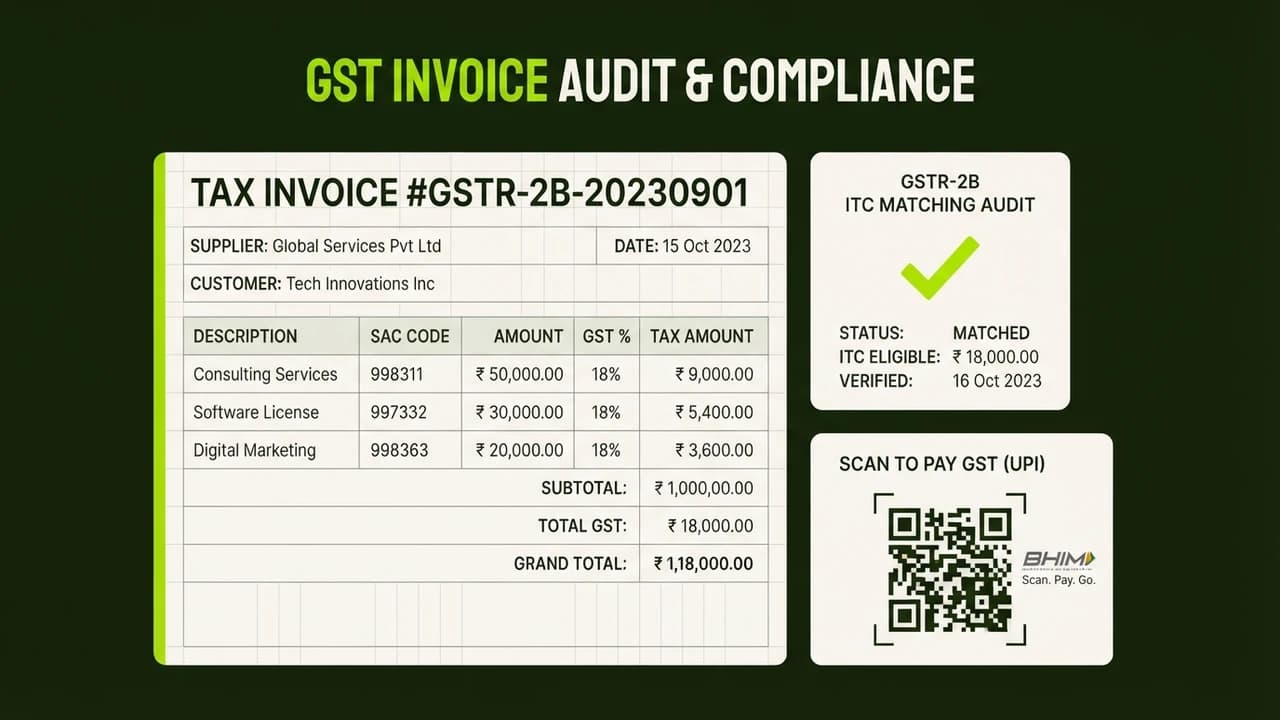
Creating a compliant tax invoice in India requires specific mandatory fields: consecutive invoice numbering, supplier GSTIN, recipient GSTIN, place of supply, state code, Service Accounting Code (SAC), and proper CGST/SGST or IGST splits.
Instead of paying for billing software, you can set up a reusable prompt in ChatGPT or Claude.
The Reusable Invoice Prompt
Copy this structured prompt into your AI workspace:
Act as an Indian Chartered Accountant. Generate a print-ready GST Tax Invoice based on these project details:
- My Business: [Your Business / Agency Name], Koramangala, Bengaluru, Karnataka (Code: 29, GSTIN: 29XXXXX1234X1ZX)
- Client: [Client Company Pvt Ltd], Andheri East, Mumbai, Maharashtra (Code: 27, GSTIN: 27YYYYY5678Y1ZY)
- Service: UI/UX Redesign for Mobile App (SAC Code: 998314)
- Fee Amount: ₹75,000
Rules:
1. Apply CGST + SGST (9% each) or IGST (18%) based on state codes.
2. Calculate tax components and final payable total.
3. Include bank details: Bank Name, IFSC, Account Number, UPI ID.
4. Output as a clean printable Markdown table.
Save this prompt as a template. Whenever you complete a milestone, change the client name, state, and fee amount. You receive a mathematically perfect, legally compliant invoice ready to export to PDF in 30 seconds.
Workflow 2: Reconciling GSTR-2B Input Tax Credit with Claude
One of the costliest mistakes Indian freelancers make is missing out on Input Tax Credit (ITC). If you buy a MacBook for ₹1,30,000 or pay ₹4,000 for your monthly Airtel fiber internet, 18% of that bill is GST you can legally deduct from your tax liability.
However, if your vendor fails to file their GSTR-1, the credit will not appear in your auto-drafted GSTR-2B statement on the GST portal. Claiming ineligible ITC invites notices from the tax department.
How to Automate Reconciliation
- Download your monthly GSTR-2B Excel file from the GST portal (
gst.gov.in). - Export your purchase invoices or bank statement for the month.
- Open Claude (free tier) and upload both files.
- Run this reconciliation prompt:
Compare List A (My Purchase Invoices) against List B (GSTR-2B Statement).
1. Match vendor GSTIN and invoice numbers.
2. Flag invoices where I paid GST but the record is missing in GSTR-2B.
3. Calculate total eligible ITC for Table 4 of GSTR-3B.
4. Output a table: Vendor Name, Invoice No, Taxable Value, GST Paid, Status (Matched / Missing in 2B / Amount Mismatch).
Claude scans line items in seconds, flagging defaulting vendors so you can ask them to file GSTR-1 promptly.
Workflow 3: Form 26AS and AIS TDS Verification in Google Sheets
Corporate clients deduct 10% TDS under Section 194J (or 1% to 2% under Section 194C). Often, accounts teams deduct tax from your payment but delay depositing it under your PAN, preventing credit during ITR filing.
The Automated TDS Audit Workflow
- Download your Annual Information Statement (AIS) and Form 26AS PDF from
incometax.gov.in. - In Google Sheets, list your client invoices: Client Name, Gross Invoiced, Net Received.
- Open Google Gemini and upload the TDS section of Form 26AS.
- Prompt the model:
Compare my billed client list against this Form 26AS statement:
1. Verify if deposited TDS matches 10% of gross invoice values.
2. Flag clients who deducted tax without depositing credit in 26AS.
3. Highlight quarterly mismatches so I can request Form 16A certificates.
This prevents unexpected tax demands in July when filing returns.
Workflow 4: Smart Expense Receipt Digitization Using Vision AI
Paper receipts for hardware, client lunches, and stationery fade quickly. Indian GST rules require documentation retained for six years.
The Zero-Cost Scanner Pipeline
- Photograph physical bills or screenshot digital receipts (Amazon Business, Uber).
- Upload images to Google Drive.
- Open Gemini 1.5 Flash and prompt:
Extract data from these Indian expense receipts as a CSV table:
Date (DD/MM/YYYY), Merchant Name, Merchant GSTIN, Invoice Number, Category, Taxable Amount (INR), CGST (INR), SGST (INR), IGST (INR), Total Amount (INR), ITC Eligibility.
Note: Personal meals and cabs are blocked under Section 17(5) unless billable to clients.
Gemini outputs clean rows ready for your spreadsheet with zero manual typing.
Workflow 5: WhatsApp Payment Reminder Bot with Dynamic UPI Links
Chasing overdue payments awkwardly over calls harms client relationships. The free tier of Make.com (1,000 monthly operations) lets you build an automated reminder flow.
How to Build the Reminder Flow
- Maintain an invoice sheet with columns:
Client,Due_Date,Amount,Status. - Schedule Make.com to check the sheet daily at 9:00 AM.
- For pending invoices due in 3 days, generate a dynamic UPI link:
upi://pay?pa=yourname@icici&pn=YourName&am=45000&cu=INR&tn=Invoice104
- Send an automated reminder via WhatsApp API or email:
"Hi Priya, gentle reminder that Invoice #104 for ₹45,000 is due on 28th October. Settle via bank transfer or tap this instant UPI link to pay via GPay or PhonePe: [Link]. Thank you!"
Automated reminders cut payment delays by half without awkward conversations.
Common Tax Mistakes Indian Freelancers Must Avoid
- Incorrect SAC Codes: Using generic codes causes scrutiny. Use SAC 998314 for IT and web consulting, 998311 for management advisory, and 998391 for creative design.
- Claiming Blocked Credits: You cannot claim ITC on personal meals or vehicle fuel under Section 17(5). Claiming blocked credits triggers automated scrutiny notices.
- Mismatched Place of Supply: If your client is in Bangalore and your registered GST address is in Mumbai, charge IGST (18%), not CGST (9%) plus SGST (9%). Wrong tax heads require manual rectification.
Learn Practical AI for Your Everyday Work
Building automated workflows like these gives you an unfair advantage in client management and financial control.
To explore foundational, no-nonsense AI skills designed specifically for non-technical Indian professionals, check out our core courses:
Zero To AI: World's Easiest AI Courses
Learn how to automate daily admin tasks, build personal AI assistants, and future-proof your career in plain, simple language.

Learn to build AI workflows that handle your busywork — live sessions, real projects, zero code.
See the courseBeginner-friendly