.jpg&w=1080&q=75)
How Indian CA Firms Use AI Agents for Automated GST Reconciliation (2026)

How Indian CA Firms Use AI Agents for Automated GST Reconciliation (2026)
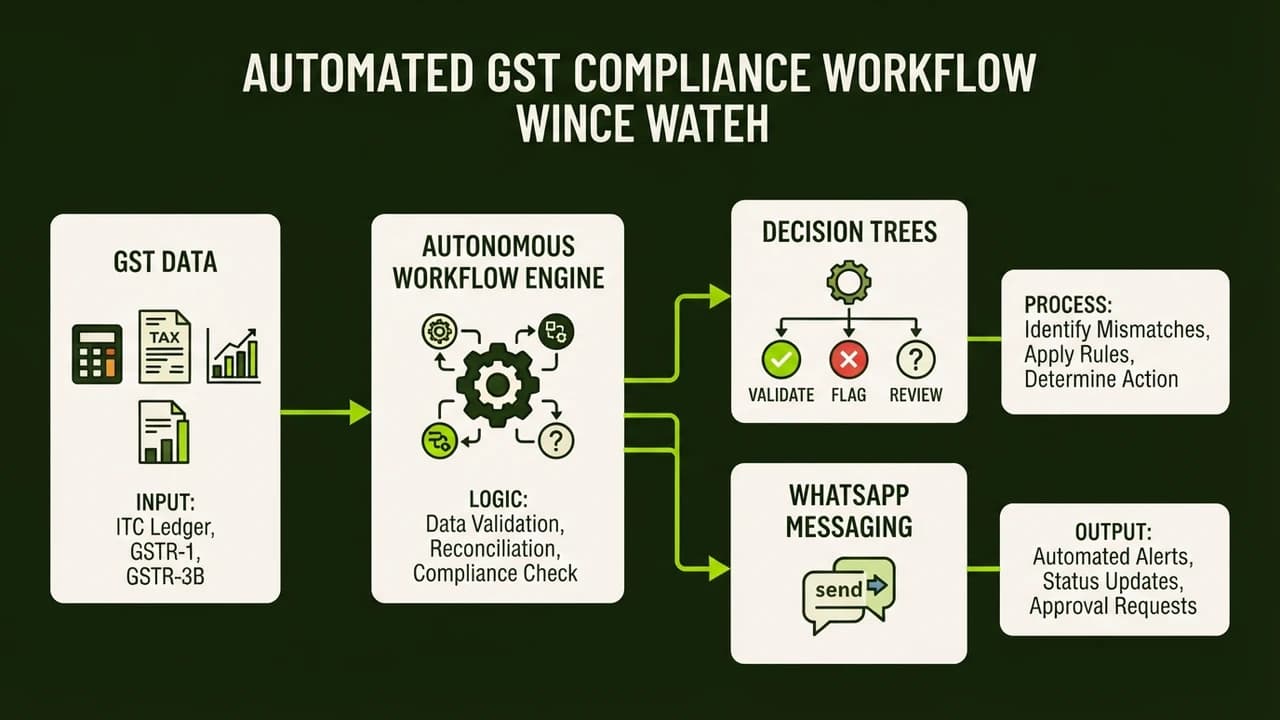
Indian Chartered Accountant firms use no-code AI agents to automate GST reconciliation by matching client purchase registers against government portal GSTR-2B data in real time. Built with visual workflow platforms like n8n or Make.com and language models like Claude 3.5, these autonomous agents flag mismatched input tax credits, extract data from scanned bills, and send missing invoice reminders directly over WhatsApp.
For accounting practitioners in Mumbai, New Delhi, Bengaluru, and Ahmedabad, monthly compliance between the 12th and 20th is notoriously intense. Junior article assistants spend late nights cross-referencing thousands of Excel entries. When suppliers fail to upload invoices on the GST portal or enter wrong GSTINs, clients lose legitimate Input Tax Credit (ITC). Autonomous AI agents turn this manual grind into an automated background workflow that completes in minutes.
The GST Reconciliation Bottleneck Facing Indian Accounting Practices
Under India's Goods and Services Tax framework, claiming Input Tax Credit requires exact alignment between client books and government portals. Under Section 16(2)(aa) of the CGST Act, a business can claim tax credit only if the vendor filed GSTR-1 and the invoice appears in the recipient's GSTR-2B statement.
Clients often hand over paper bills, unorganized drive folders, or Tally exports right before the 20th. With GSTR-2B generated on the 14th, firms have just 6 days to reconcile purchases before filing GSTR-3B.
Manual reconciliation in Excel fails for four reasons:
- Inconsistent Invoice Formatting: A supplier logs
INV/2026/0482, while the client records482. Standard Excel formulas like VLOOKUP fail on these non-identical strings. - Tax Rounding Differences: Minor paise differences between billing software and the GST portal cause spreadsheet lookups to throw error flags.
- Unreported Invoices: Vendors receive payment but delay GSTR-1 filings, blocking the client's tax credit in GSTR-2B.
- Physical Bill Backlogs: Small suppliers still issue paper receipts, requiring manual data entry before reconciliation begins.
When errors occur, clients face blocked cash flow or tax scrutiny notices under Section 73 or 74, carrying mandatory 18 percent annual interest penalties.
Manual Excel vs Dedicated GST Software vs Autonomous AI Agent Stack
Indian accounting practices choose between manual spreadsheets and expensive desktop software. Modern AI agents introduce an automated system that connects spreadsheets, accounting software, and WhatsApp without human intervention:
Operational Metric | Traditional Microsoft Excel Matching | Dedicated Enterprise GST Software | Autonomous No-Code AI Agent Stack |
|---|---|---|---|
Underlying Matching Logic | Rigid string formulas (VLOOKUP, INDEX MATCH) | Pre-programmed algorithmic rule engines | Large language model reasoning and fuzzy matching |
Handling Inconsistent Invoice Formats | Fails; requires manual string cleaning | Partial matching with rigid percentage thresholds | Interprets variations like |
Physical and Scanned Bill Ingestion | Requires manual typing into Tally or Excel | Basic OCR with frequent field alignment errors | Vision models extract line items from photos in seconds |
Missing Invoice Vendor Communication | Article assistants must call or email vendors | Generic automated email reminders with low open rates | Contextual WhatsApp messages sent directly to vendor accounts |
Monthly Software Expense | ₹0 (included in basic office software) | ₹15,000 to ₹60,000 annual subscription | ₹1,500 to ₹3,500 monthly (workflow hosting and API tokens) |
Setup and Maintenance Complexity | Low setup, but high recurring manual labor | Moderate setup with vendor lock-in and rigid UI | Low setup using drag-and-drop visual workflow builders |
Average Monthly Audit Time Saved | 0 hours (baseline manual process) | 25 to 40 hours per 50 client files | 80 to 110 hours per 50 client files |
Audit Trail and Discrepancy Logging | Disorganized spreadsheets prone to accidental edits | Static PDF reports stored inside software silo | Auto-generated Google Sheets dossiers shared with clients |
The 5-Step Architecture of an Automated GST Matching Pipeline
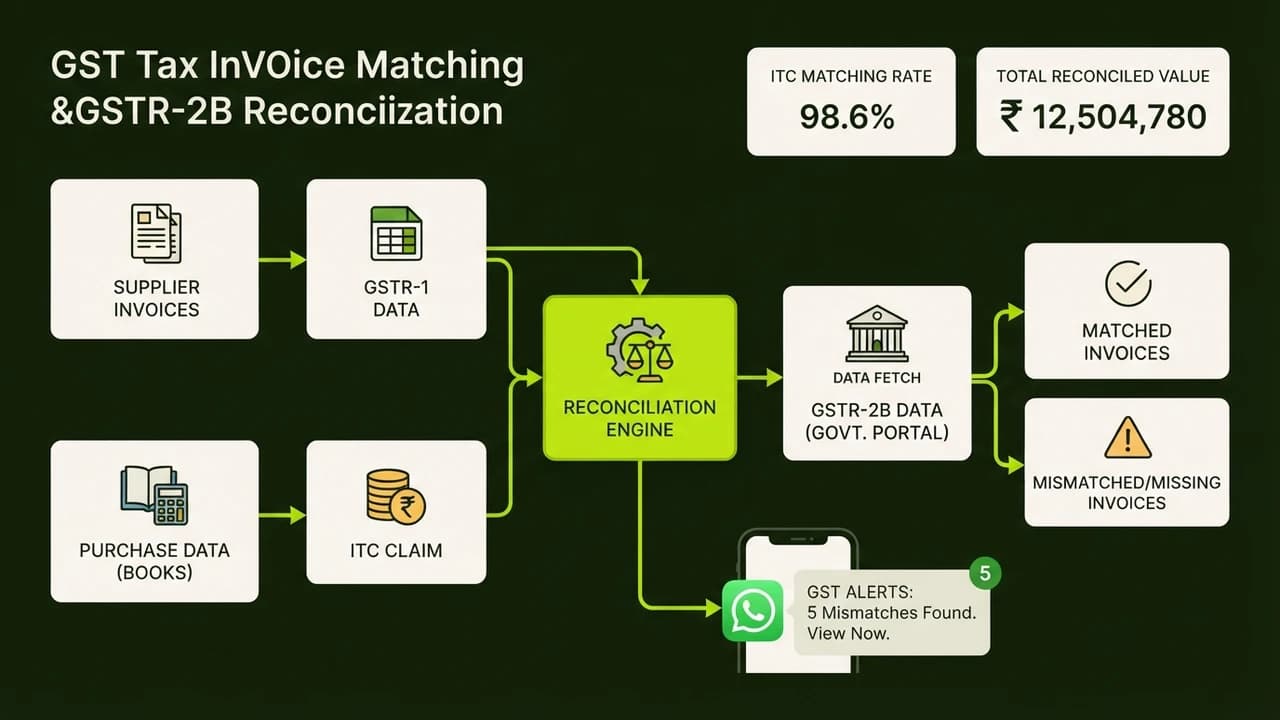
Accounting professionals can construct an automated GST reconciliation agent using five visual steps:
Step 1: Automated Ingestion of GSTR-2B and Purchase Books
The agent monitors a dedicated Google Drive folder for purchase registers from Tally Prime, Zoho Books, or Busy, alongside GSTR-2B Excel files from the GST portal. A workflow in n8n or Make.com standardizes both datasets into clean tables containing Supplier GSTIN, Invoice Number, Invoice Date, Taxable Value, and Tax Components (CGST, SGST, IGST).
Step 2: Multi-Modal Vision Processing for Physical Bills
When clients submit paper bills or WhatsApp photos, traditional software fails on skewed receipts. The AI agent routes images to Claude 3.5 Sonnet or Gemini 1.5 Flash. The model extracts vendor GSTINs, dates, and line items, verifies tax rates (5, 12, 18, or 28 percent), and logs them directly into the purchase register.
Step 3: Fuzzy Matching and Invoice Normalization
In your visual workflow canvas, a filter node matches records where Supplier GSTIN in the client book matches Supplier GSTIN in GSTR-2B. For invoice numbers with varying slashes or prefix codes, a fast language model prompt reconciles discrepancies:
Compare these two invoice identifiers:
Internal Book Record: "PB/26/089"
GSTR-2B Portal Record: "89"
Are these logically referring to the same document? Answer YES or NO with confidence score.
If the confidence score exceeds 0.90 and total tax amounts match within ₹1, the workflow confirms the match and marks the status as Reconciled.
Step 4: Discrepancy Routing and WhatsApp Vendor Alerts
The agent classifies non-matched entries into three buckets:
- Tier 1 (Supplier Omission): Invoices in client books but absent from GSTR-2B.
- Tier 2 (Tax Calculation Discrepancies): Invoices present in both records, but differing in tax amounts.
- Tier 3 (Pending Physical Verification): Low-clarity scanned receipts requiring staff review.
For Tier 1 missing invoices, the agent retrieves vendor contact details and sends an automated WhatsApp message:
Dear Vendor Partner,
While reconciling GST records for [Client Business Name] for the month of [Month Year], we observed that Invoice No. [Invoice_Number] dated [Invoice_Date] for ₹[Tax_Amount] is not visible in GSTR-2B.
Please ensure this invoice is uploaded in your upcoming GSTR-1 filing to avoid payment delays or tax credit disallowance.
Step 5: Master Audit Dossier Generation for GSTR-3B
Once reconciliation finishes, the agent compiles a master Google Sheets workbook containing Table 4(A)(5) Eligible Input Tax Credit ready to copy into GSTR-3B, Table 4(B) Ineligible credits, and full vendor discrepancy logs. The audit team reviews the dashboard in ten minutes and files with complete accuracy.
Real Indian Firm Case Study: How a Mumbai CA Practice Saved 84 Audit Hours Monthly
K. R. Mehta & Associates is a mid-sized Chartered Accountancy practice based in Fort, Mumbai. The firm manages monthly compliance and audits for 65 business clients, including manufacturing units in Bhiwandi and trading firms in Kalbadevi.
The Operational Challenge
Every month between the 13th and 20th, four junior article assistants spent 25 hours each on manual GST matching in Excel. Due to tight filing deadlines, invoice mismatches were frequently missed, causing clients to lose an estimated ₹4,20,000 in legitimate input tax credits quarterly. Senior partners spent billable hours reviewing messy spreadsheets instead of focusing on high-margin tax planning and advisory.
The Autonomous No-Code AI Solution
In early 2026, the firm implemented an automated GST reconciliation agent built on self-hosted n8n, Claude 3.5 Sonnet, and Google Sheets:
- Centralized Data Hub: Clients drop Tally exports into shared Google Drive folders before the 13th.
- Instant Processing: The firm uploads GSTR-2B Excel sheets, and the agent processes all 65 clients in under 20 minutes.
- Automated WhatsApp Follow-ups: The agent identifies missing invoices and dispatches personalized WhatsApp reminders to vendor finance teams on the 15th, giving them 48 hours to update filings before GSTR-3B cut-offs.
- Partner Summary View: Partners receive an automated one-page WhatsApp summary showing eligible ITC, blocked credits, and vendor status for every client.
Measurable Results and Return on Investment
The transformation in the firm's monthly operations was immediate:
- Audit Hours Saved: Cut manual reconciliation time from 100 hours down to 16 hours, saving 84 billable hours monthly.
- Tax Credit Recovery: Recovered ₹6,80,000 in unrecorded or blocked ITC for manufacturing clients in the first 60 days.
- Faster Filing Turnaround: All 65 GSTR-3B returns are now finalized by the 18th, two days ahead of the deadline.
- Operating Cost: The complete AI setup costs ₹2,150 per month, consisting of a ₹1,150 VPS and ₹1,000 in language model API tokens.
- Staff Satisfaction: Junior assistants eliminated late-night overtime and transitioned into corporate audit engagements and client advisory.
5 Critical Mistakes CA Firms Make When Automating GST Reconciliation
To ensure your automated reconciliation pipeline runs reliably, avoid these five common implementation errors:
1. Relying on Rigid Exact String Matches
Tax invoices issued by Indian vendors contain arbitrary prefixes, dashes, slashes, and financial year codes. If your automation relies solely on exact string equality, your error rate will remain high. Always incorporate fuzzy matching rules or lightweight AI text parsing to identify invoice numbers regardless of format variations.
2. Ignoring Supplier Registration Status Changes
A vendor might be present in your purchase register, but their GST registration could be cancelled or suspended during the tax period. Ensure your agent validates the vendor's active status against the GST public database so your client does not claim ineligible tax credits under Section 16.
3. Dispatching Unverified or Aggressive Vendor Notices
Automating WhatsApp notifications without guardrails can damage client-vendor relationships. Frame all automated alerts as polite reconciliation queries, and include an internal approval checkpoint before messages are dispatched for disputed balances exceeding ₹50,000.
4. Overlooking Blocked Credits Under Section 17(5)
Not all purchases in GSTR-2B are eligible for tax credit claims. Goods purchased for personal consumption, food, club memberships, and motor vehicles are blocked under Section 17(5) of the CGST Act. Configure your workflow to cross-reference expense ledgers and automatically segregate blocked credits from eligible deductions.
5. Storing Confidential Taxpayer Data in Public Environments
Client purchase registers contain sensitive commercial information. Avoid pasting raw client spreadsheets into public consumer chat tools. Always deploy secure API connections where vendor data is not stored or used to train public machine learning models.
Build Your First AI Agent in Just 40 Minutes at Zero To AI
Automating repetitive accounting tasks like GST reconciliation is the fastest way for finance professionals and founders to eliminate compliance errors. You do not need an engineering degree or expensive software contracts to deploy practical automation systems inside your firm.
At Zero To AI, we provide step-by-step training designed specifically for non-technical Indian professionals, accountants, and business owners looking to master real-world AI applications.
Build Your First AI Agent in Just 40 Minutes (No Code Required)

Learn to build AI workflows that handle your busywork — live sessions, real projects, zero code.
See the courseBeginner-friendly