.jpg&w=1080&q=75)
How to Build a WhatsApp Customer Support AI Agent Without Coding (2026)

How to Build a WhatsApp Customer Support AI Agent Without Coding (2026)
To build a WhatsApp customer support AI agent without coding, you connect the official WhatsApp Cloud API to a visual automation platform like Make.com or n8n and link it to an AI model such as OpenAI GPT-4o or Claude 3.5. This autonomous agent handles customer inquiries, checks live spreadsheet records for order or appointment data, and shares instant UPI payment links for immediate order settlement.
For Indian business owners running retail stores, beauty salons, healthcare clinics, or professional services, customer communication happens primarily on WhatsApp. Indian consumers rarely check email or download custom apps to ask about product availability or service prices. An autonomous WhatsApp AI agent delivers instant, context-aware answers, qualifies leads, and completes transactions 24 hours a day without adding full-time support staff.
Why Indian Businesses Need WhatsApp AI Agents Instead of Rigid Chatbots
Over 800 million Indians use WhatsApp daily. However, many business owners who attempted WhatsApp automation in past years walked away frustrated because they deployed rigid, rule-based chatbots.
A traditional rule-based bot greets customers with a rigid script: "Press 1 for Store Hours, Press 2 for Pricing, Press 3 to Speak with an Executive." When an Indian customer types, "Bhaiya, do you have the blue kurta in size 42 in your Pune store, and can I get it by tomorrow evening?", the rule-based bot fails with an invalid input error. The customer leaves, and the sale is lost to a competitor.
An autonomous AI agent uses modern language models to interpret user intent, language nuances, and informal conversational phrasing, including Hinglish. Instead of regurgitating static scripts, the agent performs four operational tasks:
- Understands Natural Context: Extracts product names, preferred appointment dates, and customer intent from casual messages.
- Consults Real-Time Business Data: Queries live inventory or CRM records to confirm stock or doctor availability.
- Executes External Actions: Updates Google Calendar, generates Razorpay UPI payment links, and creates support tickets.
- Applies Strict Guardrails: Adheres strictly to your pricing cards, return policies, and escalation thresholds.
Chatbot vs. Rule-Based Bot vs. Autonomous WhatsApp Agent
Understanding the differences between conversational technologies helps Indian founders choose the right system for their operations:
Capability Metric | Standard Conversational Bot | Traditional Rule-Based Bot | Autonomous WhatsApp AI Agent |
|---|---|---|---|
Underlying Engine | Standalone language model interface | Hardcoded if-else decision trees | Language model coupled with workflow tool APIs |
Indian Language & Hinglish | Understands text, but cannot act | Fails completely on slang and typos | Interprets colloquial Hinglish and typos accurately |
Live Inventory & Database Access | No external software access | Limited to fixed database scripts | Reads and writes directly to Google Sheets or Airtable |
Booking & Calendar Management | Cannot check or reserve slots | Follows rigid, inflexible time menus | Dynamically checks free slots and books appointments |
Payment Collection (UPI) | Generates static advice only | Shares static UPI QR code images | Generates unique dynamic Razorpay UPI payment links |
Exception & Error Handling | Hallucinates or repeats text | Displays generic invalid input errors | Analyzes errors, clarifies details, or alerts human staff |
Monthly Software Expense | ₹1,650 (standard AI plan) | ₹2,500 to ₹6,000 (legacy bot tools) | ₹1,200 to ₹3,500 (API tokens and visual workflows) |
Coding Skills Required | None | Low to moderate script setup | Zero; uses visual drag-and-drop workflow canvases |
The 4 Core Building Blocks of a No-Code WhatsApp Agent
You do not need to write code or manage servers to launch a production-grade WhatsApp AI agent. The modern non-coder stack relies on four modular components connected via webhooks:
- WhatsApp Cloud API: The official Meta messaging infrastructure. It delivers messages reliably, prevents phone number bans, and enables verified business profiles.
- Visual Orchestration Engine (Make.com or n8n): The workflow coordinator. It receives WhatsApp webhooks, routes messages to the AI engine, searches spreadsheets, and delivers responses back to the customer.
- Reasoning Engine (Claude 3.5 Sonnet or GPT-4o-mini): The cognitive core. Using lightweight models via API costs fractions of a paisa per message. A five-message customer inquiry costs under ₹0.25 in API fees.
- Live Business Database (Google Sheets or Airtable): The data layer holding service menus, prices, doctor schedules, and stock counts. Non-technical staff can update prices in seconds without altering automations.
Step-by-Step Implementation Guide: Building Your Agent
Follow this six-step implementation plan to assemble and launch your no-code WhatsApp AI agent:
Step 1: Configure WhatsApp Cloud API in Meta Developer Portal
Visit Meta for Developers (developers.facebook.com), create a new app, select Business, and add WhatsApp. Meta provides a temporary access token, test phone number, and WhatsApp Business Account ID. Test with your phone number before attaching a permanent business SIM.
Step 2: Establish the Webhook Listener in Make.com or n8n
Create a workflow in Make.com or n8n with a Custom Webhook trigger. In Meta Developer console under WhatsApp > Configuration, paste your webhook into Callback URL, enter a verification token, and subscribe to messages. Incoming WhatsApp messages trigger your workflow in real time.
Step 3: Connect Your Google Sheet Knowledge Base
Create a Google Sheet with tabs for Services_and_Pricing and Customer_Inquiries. List services and prices in Indian Rupees, inclusive of 18 percent GST. Add a Google Sheets Search Rows module after the webhook trigger to find rows matching user inquiries.
Step 4: Configure the AI System Prompt and Operating Guardrails
Add an AI module connecting to Claude or OpenAI API. Use a focused system prompt that establishes role, language style, and operating boundaries:
You are the customer care representative for "Apex Wellness Clinic" in Indiranagar, Bengaluru.
Your goal is to assist patients with consultation scheduling, doctor availability, and treatment pricing.
Tone: Warm, polite, professional, and comfortable with Indian English and Hinglish expressions.
Currency: Always quote prices in Indian Rupees (INR) with the ₹ symbol.
Rules:
1. Answer only using the provided clinic schedule and price list.
2. Direct medical emergencies to our physical clinic immediately or dial 112.
3. For booking, collect full name, preferred day, and preferred morning or evening slot.
4. Keep replies under 60 words for easy reading on mobile screens.
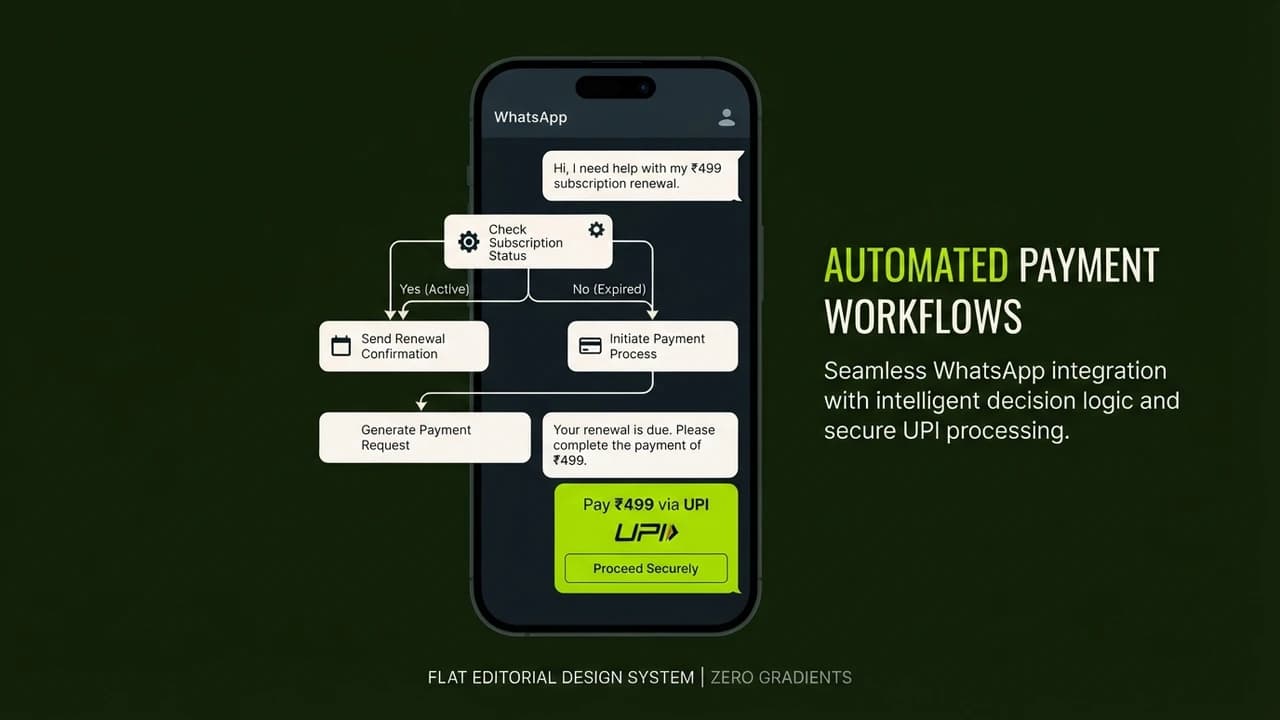
Step 5: Integrate Dynamic UPI Payment Links via Razorpay
To confirm appointments or orders instantly:
- Generate API keys in your Razorpay dashboard.
- Add an HTTP module calling Razorpay Payment Links API (
https://api.razorpay.com/v1/payment_links). - Set payload parameters: amount in paise (such as
50000for a ₹500 booking deposit), customer phone number, and purpose. - The workflow returns a link in WhatsApp: "Tap here to confirm your ₹500 consultation slot:
https://rzp.io/l/xyz". - A secondary webhook listener detects payment completion, reserving the calendar slot and sending a confirmation receipt.
Step 6: Deploy Human Escalation Fail-Safes
Implement a fail-safe handover. If a customer types "talk to human", "complaint", or "refund", the workflow flags the inquiry in Google Sheets and alerts the store manager via WhatsApp. The AI pauses automated messages for that customer for 4 hours, letting staff handle sensitive issues directly.
Real Indian Business Case Study: How a Pune Dental Clinic Scaled Appointments
Dr. Aniket Sharma operates a dental clinic in Kothrud, Pune, treating 25 to 35 patients daily across two dental chairs.
The Operational Challenge
Dr. Sharma employed a single receptionist who was busy assisting in-person patients and billing. Over 35 percent of new patient inquiries on WhatsApp arrived between 8:00 PM and midnight when the clinic was closed. Delayed responses caused patients to book with rival clinics, resulting in an estimated monthly revenue loss of ₹1,80,000.
The No-Code AI Solution
Dr. Sharma deployed an automated WhatsApp agent using n8n, Claude 3.5 Haiku, Google Calendar, and Razorpay:
- Instant Engagement: Inquiries receive a context-aware response within 12 seconds.
- Scheduling Intelligence: The agent checks Google Calendar for open 45-minute consultation slots over the next three days.
- Transparent Pricing: It explains treatments and quotes fees (₹400 for general evaluation, ₹3,500 to ₹7,000 for root canals).
- Token Deposit Collection: It generates a ₹200 advance UPI booking deposit link via Razorpay, curbing no-shows.
- Automated Reminders: Upon payment, the appointment is booked in Google Calendar, and the patient receives a clinic location pin.
Measurable Business Results
Within 90 days, Dr. Sharma recorded significant practice improvements:
- Consultation Growth: Added 64 confirmed consultations per month.
- Monthly Revenue Increase: Gross clinic receipts grew by ₹2,45,000 per month from after-hours inquiries.
- Cancellation Drop: Advance UPI token deposits slashed appointment cancellations from 26 percent to 4 percent.
- Monthly Software Cost: The setup runs on n8n hosting (₹1,100/month) and Claude API usage (₹550/month), totaling ₹1,650 per month.
- Staff Focus: The clinic receptionist now focuses entirely on in-person patient hospitality without handling ringing phones.
5 Common Mistakes Indian Businesses Make With WhatsApp AI Agents
Avoid these five critical pitfalls when planning and launching your automated WhatsApp workflows:
1. Using Unofficial Web Scrapers Instead of Meta Official API
Many vendors sell cheap tools connecting to WhatsApp Web via unofficial scripts. Meta actively bans numbers using scrapers. Always build on the official Meta WhatsApp Cloud API to safeguard your business number.
2. Omitting a Clear Human Escalation Route
Customers become frustrated when a bot cannot solve their problem. Always provide a clear human handover option. An agent that alerts a human manager preserves customer trust.
3. Relying on Disorganized Spreadsheets as Knowledge Sources
An AI agent depends on clean data. Outdated prices or expired promotions in Google Sheets cause inaccurate replies. Audit and maintain clean reference sheets weekly.
4. Confirming Orders Without Webhook Payment Verification
Never program an AI agent to confirm orders based solely on customer messages or screenshots. Verify incoming payment webhooks from Razorpay or your bank before confirming orders.
5. Overcomplicating System Prompts With Complex Jargon
Avoid academic or verbose prompts. Provide concrete examples of common inquiries, set your currency to Indian Rupees, and define clear boundaries to ensure reliable replies.
Build Your First AI Agent in Just 40 Minutes at Zero To AI
Learning the technical concepts behind automated support agents is valuable, but deploying a working system that actively handles customer conversations and collects payments provides real business leverage. You do not need software engineering experience or expensive agency retainers to build production-grade automations for your business.
At Zero To AI, we teach non-technical Indian professionals, entrepreneurs, and freelancers how to assemble practical, revenue-generating AI systems step by step.
Build Your First AI Agent in Just 40 Minutes (No Code Required)

Learn to build AI workflows that handle your busywork — live sessions, real projects, zero code.
See the courseBeginner-friendly